Project Overview
Brandito’s storefronts sent orders directly to ShipHero, and Brandito’s team batch-imported them into Acumatica after the fact. Brandito wanted one integration layer with Acumatica at the center of its online stores. In Brandito’s setup, the two storefront platforms also handle tax, payments, and gift certificates differently. Accounting needed every order, payment, refund, and tax line booked to the right branch and general ledger account, with tax reaching Avalara only once.
Brandito partnered with Snapshot to build the integration on Celigo. Snapshot built flows for orders, inventory, and products across both storefront platforms. Every store now connects through Acumatica, and no store sends orders to ShipHero directly. Orders now flow into Acumatica, shipments and invoices flow out, and tracking returns to the customer.

Order-to-Cash Flows
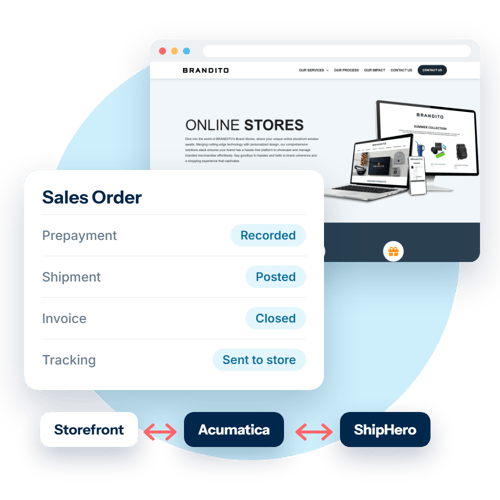
Snapshot built 16 Celigo order-to-cash flows that carry each order from checkout to a closed invoice. When a customer checks out on either storefront, Celigo creates an Acumatica sales order, records the payment as an Acumatica prepayment with the storefront transaction ID, and sends the order to ShipHero. Each ShipHero shipment posts against the Acumatica sales order, including partial shipments, split shipments, and gift-card-only orders. At shipment, Celigo creates the invoice in Acumatica, closes it, and writes tracking back to the store.
Accounting and Tax Accuracy
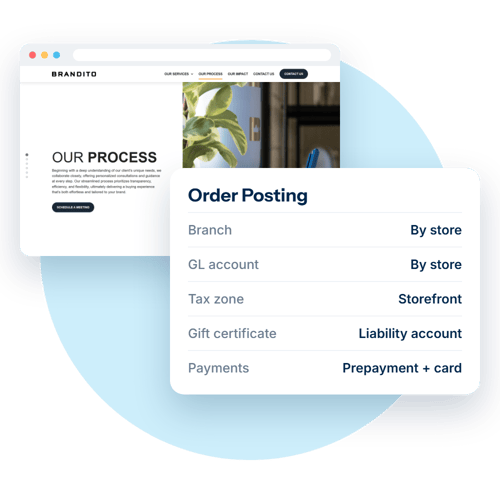
Celigo posts each order to the correct Acumatica branch and general ledger account. Both storefronts send tax to Avalara directly, so Snapshot mapped each order to a storefront tax zone that prevents Avalara from receiving the same tax twice. For BrightStores orders, Celigo maps line tax to the general ledger by ship-to state, and Acumatica records tax exactly as the storefront charged it.
Celigo posts gift certificates as a non-stock item to each store’s liability account. When a customer pays with a gift certificate and a card, Celigo records two Acumatica payments on the order. Each Acumatica order number combines the customer and the store order number, so order numbers stay distinct across stores.
Order Exceptions
Snapshot built Celigo flows for these order exceptions:
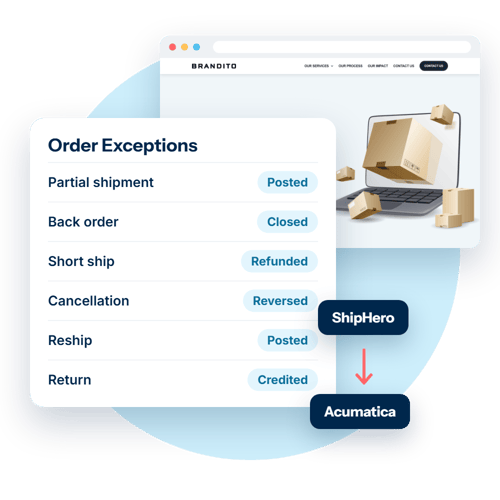
- Partial and split shipments: Celigo posts each shipment against the original Acumatica sales order.
- Back orders: When ShipHero shows nothing left to ship, Celigo closes the remaining quantity in Acumatica and refunds the unbilled amount.
- Short ships: Warehouse staff edit the quantity in ShipHero. Celigo completes the order and refunds the difference against the prepayment.
- Cancellations: A cancellation can start in the storefront or in ShipHero. Either way, Celigo reverses the payment first, cancels the order in both systems, and creates the refund.
- Refunds: Celigo applies each customer refund to the prepayment and releases it.
- Reships: Celigo posts a reship as a second shipment on the original order and records an inventory adjustment in Acumatica for the reshipped goods.
- Returns: Warehouse staff create the return in ShipHero and receive the goods against it. Celigo then books a return order, a receipt, a credit memo, and a refund in Acumatica. Refunds go to the original card, or to the customer’s account balance for BrightStores orders.
Inventory and Product Sync
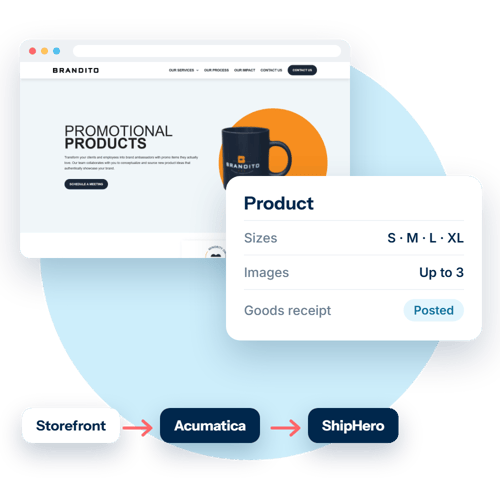
Celigo posts ShipHero goods receipts for both stores into Acumatica, replacing a weekly upload. Inventory corrections also post to Acumatica automatically. When a product is added or changed in a storefront, Celigo creates or updates it in Acumatica and ShipHero with its sizes and up to three images.
The Impact: One Integration Layer from Checkout to Closed Invoice
In its first week live, the integration:
- Processed 41 orders (967 units) from the BigCommerce and BrightStores stores
- Posted 40 shipments (922 units) to Acumatica and wrote tracking for each back to the store
- Recorded 41 customer payments
- Booked 2 warehouse receipts (1,018 units) into Acumatica
- Updated 606 items in Acumatica and ShipHero through the product sync
- Ran on 24 Celigo flows across orders, goods receipts, inventory, and products
In that first week, orders posted to the correct branch and general ledger account, Acumatica recorded BrightStores tax as the storefront charged it, and no tax was submitted to Avalara a second time.
Brandito plans to build on the same integration in a next phase, with Celigo sending stock levels to both storefronts so shoppers can see what is in stock before they order. Because each store connects only to Acumatica, the flows between Acumatica and ShipHero work the same for any store. Brandito plans to bring more of its storefronts onto the integration and reuse those flows for each new store with few changes.
Talk to an Integration Expert
Why Companies Choose Snapshot:
At Snapshot, we don't just implement software, we assist companies in modernizing and scaling operations by simplifying operational complexity
NetSuite Consulting & Development
With over 12 years as a NetSuite Alliance Partner, we provide full-lifecycle consulting, SuiteApp development, and long-term optimization. Our focus is on leveraging NetSuite as the core engine of your business to drive scalability and predictive insights.
eCommerce Excellence
With over 25 years of commerce expertise, we understand that a storefront is only one piece of a much larger picture. Our approach takes into consideration your entire ecosystem, from the customer-facing experience to the critical business systems that power fulfillment, finance, and operations. We ensure your commerce platform isn't just a "bolt-on," but a high-performance tool built around your unique business architecture.
Data Integration Expertise
We specialize in high-performance connectivity using Celigo, Patchworks, and custom solutions. We focus on unifying disparate data silos to ensure your business operates with one cohesive data set.