
AR Workbench: NetSuite Cash Application and Credit Matching
A NetSuite cash application screen for AR teams: open invoices, credit memos, unapplied payments and deposits side by side, with explained matching and native records.
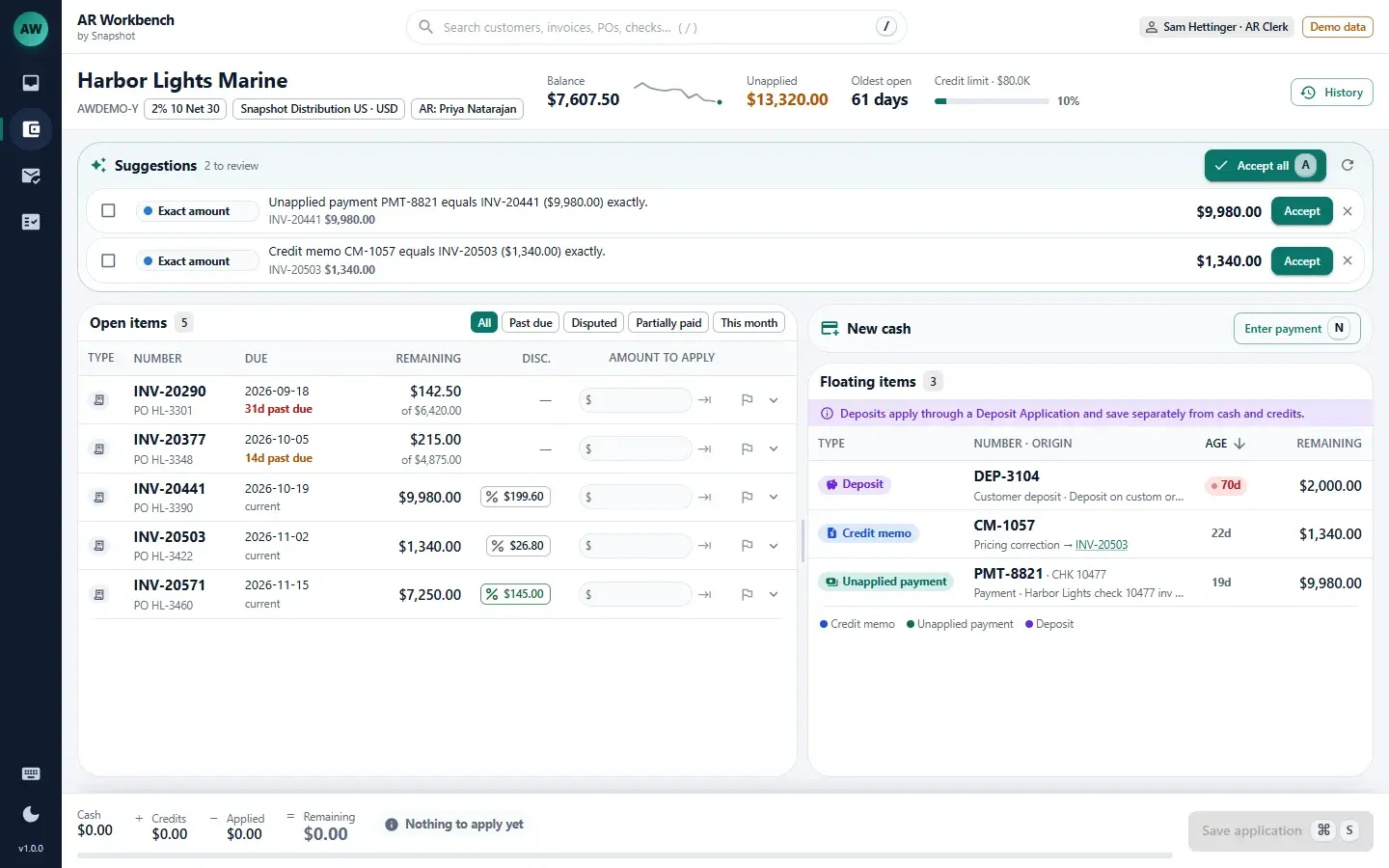
Cash application, credit matching and follow-up on one screen.
Customer workbench
The customer's balance, unapplied total, oldest open item and credit used sit across the top, with open invoices and floating items in two grids below. Every amount can be edited in place.
Match suggestions
Six ordered rules (exact amount, reference, source link, discount, tolerance and oldest first) propose each application and name the rule that matched. Nothing applies until the clerk accepts it.
One save, native records
A single save creates the Customer Payment, credit memo application or Deposit Application. Deposits are applied separately from payments, so the two never mix.
Short-pays & disputes
When a customer pays less than the invoice, AR Workbench asks for a reason, notes, a follow-up and an owner, then writes the memo. The payment saves only after a reason is selected.
Worklist & remittance import
A nightly aging job builds six work queues, including unapplied return credits and unapplied cash. Remittances import by CSV or by pasting them in.
Approvals & reports
Write-offs and un-applies above a set threshold route to a manager for approval. Six reports cover aged unapplied credits, short-pays by reason, and DSO compared with unapplied-adjusted DSO.
From the AR clerk to the controller.
Built to prevent cash application mistakes.
- Every match is reviewed.Each suggestion shows the rule that produced it and waits for a clerk to accept it. Admins set the rule order in settings, with no redeployment.
- Return credits get applied.A credit memo from a return that was never applied lands in its own queue, linked to the source invoice.
- Short-pays and deposits stay traceable.Every short-pay records a reason and an owner, and deposits apply only through their own Deposit Application.
See how AR Workbench fits your finance team
Tell us how your team applies cash and works short-pays today, and a NetSuite specialist will walk you through AR Workbench and how it fits your NetSuite account.
Book an AR Workbench demo
FAQ
Questions about AR Workbench
Don't see yours? Ask our NetSuite team and someone will get back to you.
What is AR Workbench?
AR Workbench is a NetSuite app from Snapshot Design for cash and credit application. It shows one customer's open invoices, floating credit memos, unapplied payments and deposits side by side, suggests matches with the rule behind each one, and saves every application as a native NetSuite record.
Who is AR Workbench built for?
AR Workbench is built for AR clerks, AR managers and controllers at mid-market distributors running NetSuite.
How does AR Workbench suggest matches?
Six ordered rules (exact amount, reference, source link, discount, tolerance and oldest first) propose each application and name the rule that matched. Nothing applies until the clerk accepts the suggestion, and admins can change the rule order in settings.
What NetSuite records does AR Workbench create?
A single save creates the native Customer Payment, credit memo application or Deposit Application. AR Workbench posts to the general ledger only through those standard NetSuite records.
How does AR Workbench handle short-pays?
When a customer pays less than the invoice, AR Workbench requires a reason before the payment saves and records notes, a follow-up and an owner. A short-pay report groups the shortfalls by reason.
Can AR Workbench import remittances?
Remittances import into AR Workbench by CSV or by pasting them in, and a nightly aging job builds six work queues, including unapplied return credits and unapplied cash.
What approvals and reports does AR Workbench include?
Write-offs and un-applies above a set threshold route to a manager for approval. Six reports cover aged unapplied credits, short-pays by reason, and DSO compared with unapplied-adjusted DSO.