
CRM Workspace: A Faster Sales Pipeline on NetSuite CRM
A NetSuite CRM app for sales teams: a pipeline board, record workspace, activity logging and a manager dashboard, saved to native NetSuite records.
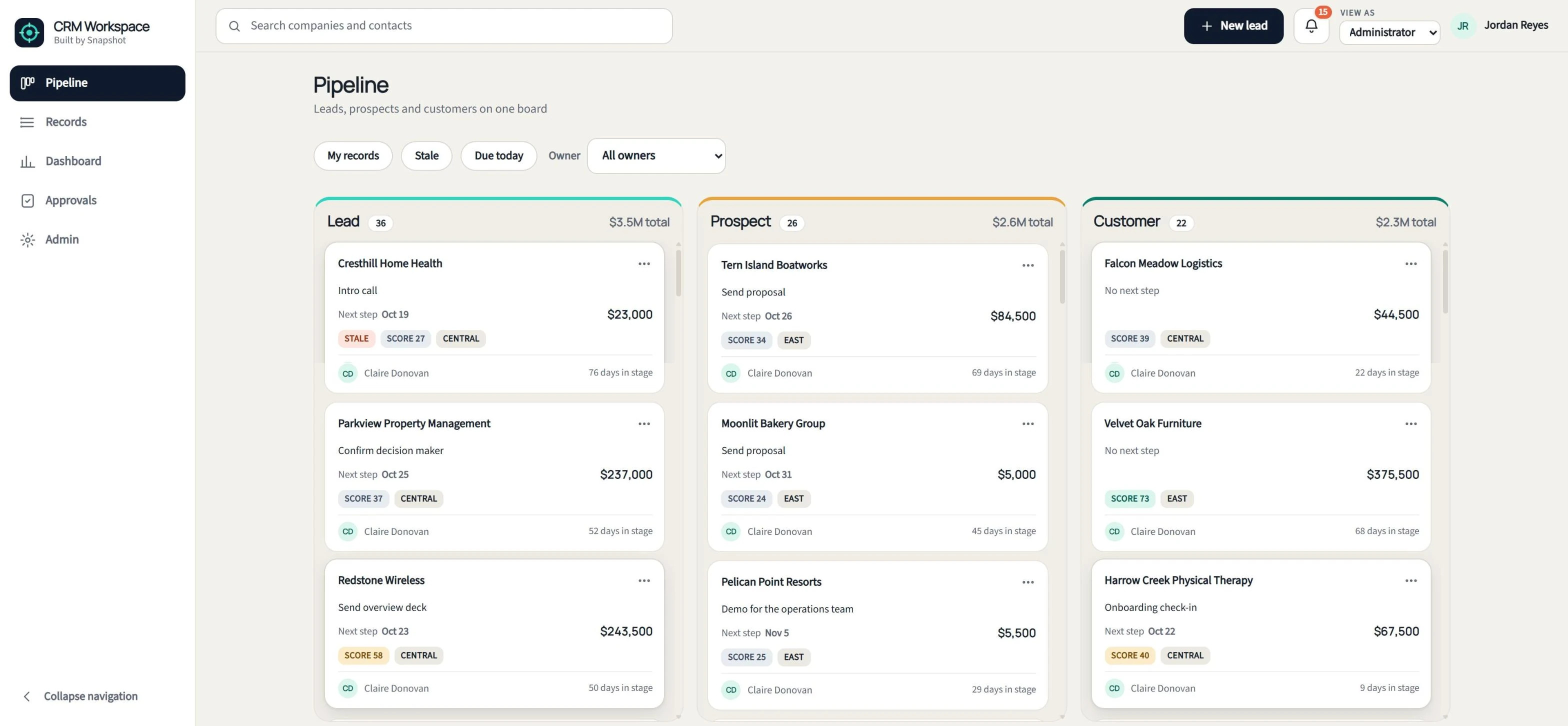
Pipeline, records and activities in one NetSuite workspace.
Pipeline board
Lead, prospect and customer columns driven by the native status. Drag a card to convert it, with required-field gates, or mark it lost, reactivate or deactivate it.
Record workspace
Details, Contacts, Activities, Timeline, Related, Emails and Audit tabs on one page, with Open in NetSuite on every record.
Lists, search & bulk actions
Server-paged lists with presets, filters, a column chooser and saved views, global search, and bulk reassign, re-status, tag or CSV export.
Quick create & activities
Create a lead with a duplicate check, then log calls, tasks, events and notes as native NetSuite activities.
Dashboard & approvals
Counts by stage, conversion rates, stale records, activity per rep and a trend chart, plus manager approval for backward moves and large lost deals.
Admin & lead scoring
Turn modules on by edition, set stage gates and fields, score leads by rule and keep an audit trail with CSV export.
A faster front end on the NetSuite CRM you already run.
Move leads to customers with the rules your team sets.
- Lead → ProspectWhen a rep converts a lead, CRM Workspace shows the fields the prospect stage requires, and the rep fills them in without leaving the board.
- Prospect → CustomerBefore a prospect becomes a customer, your admin can require a primary contact, billing details and payment terms, with the requirements set for each edition.
- Lost, inactive and reactivatedEvery lost deal records a reason. Moving a deal backward or losing a large one goes to a manager for approval, and reactivating a record reopens it.
See how CRM Workspace fits your sales team
Tell us how your sales team works leads and deals today, and a NetSuite specialist will walk you through CRM Workspace and how it fits your NetSuite account.
Book a CRM Workspace demo
FAQ
Questions about CRM Workspace
Don't see yours? Ask our NetSuite team and someone will get back to you.
What is CRM Workspace?
CRM Workspace is a NetSuite app from Snapshot Design that gives sales teams a pipeline board, a record workspace, activity logging and a manager dashboard on top of native NetSuite CRM. Every save goes to a native Customer, Contact, Task, Phone Call, Event or Note record.
Who is CRM Workspace built for?
CRM Workspace is built for sales reps and sales managers at NetSuite companies in any industry, especially teams that find native NetSuite CRM slow to work in.
How does CRM Workspace work with native NetSuite CRM?
CRM Workspace is a front end for native NetSuite CRM. Leads, prospects, customers and activities stay in standard NetSuite records, so saved searches, reports, workflows and integrations keep working on the same data.
How does the CRM Workspace pipeline board work?
Leads, prospects and customers appear as cards in columns driven by their native NetSuite status. Reps drag a card to convert it, with the next stage's required fields shown in place, or mark it lost, reactivate it or deactivate it.
What does a sales manager see in CRM Workspace?
The manager dashboard shows counts by stage, conversion rates, stale records, activity per rep and a trend chart. Managers also approve backward moves and large lost deals.
Which editions of CRM Workspace are available?
CRM Workspace comes in Starter, Growth and Enterprise editions. An admin switches its 17 modules on or off without a redeploy and sets stage gates, visible fields and lead-scoring rules.
How does CRM Workspace handle NetSuite permissions?
CRM Workspace runs as the logged-in user, so native NetSuite role permissions apply. A rep who can't edit a customer in NetSuite can't edit that customer in CRM Workspace either.